Get your Amazon export
Amazon lets you download your own order history — it takes about two minutes to request and usually lands within 24 hours. You'll get a ZIP by email; drop it back here and rosegold reads it entirely in your browser.
Open your data-request page
Use the button above — it opens the request page for your marketplace in a new tab. Sign in if asked; Amazon sometimes re-checks your password first.
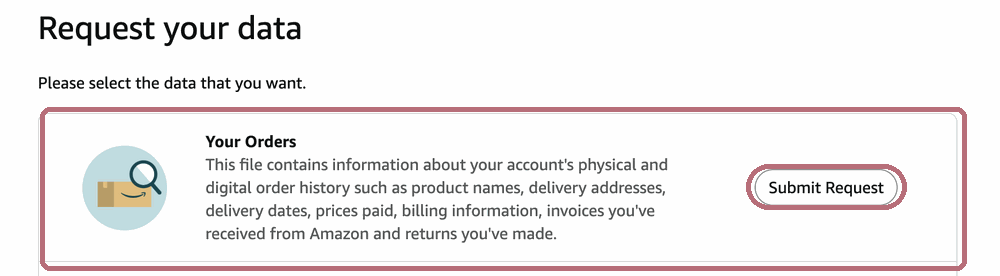
Request "Your Orders"
On "Request your data", find the Your Orders tile and click its Submit Request button. That's the only one you need — nothing else.
Confirm it by email
Amazon emails you a confirmation link (from an amazon address). Click Confirm Data Request to set it off.
Heads-up: that confirmation link expires after 5 days, so confirm it soon. Once you do, you'll see Amazon's "we're processing your request" page.
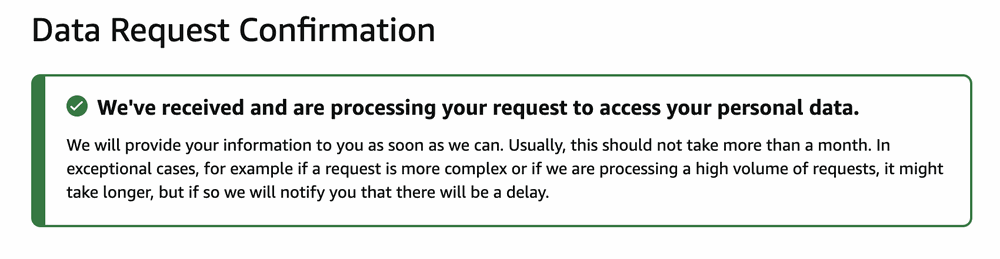
Wait for the download email
Usually it arrives within 24 hours (Amazon says it can take up to a month). When it's ready, download Your Orders.zip — the download links stay live for 90 days.
Come back and drop it in
Upload the ZIP exactly as Amazon sent it — don't unzip, open, or re-save it. rosegold checks the file is the original one Amazon produced, so an untouched ZIP verifies cleanly.